With the world changing faster than ever before, none of us have time to waste when we’re trying to get work done. Searching for information, finding an expert to help your customer, or switching between apps all day long—all of these things slow down the flow of work and keep us from delivering customer experiences that matter.
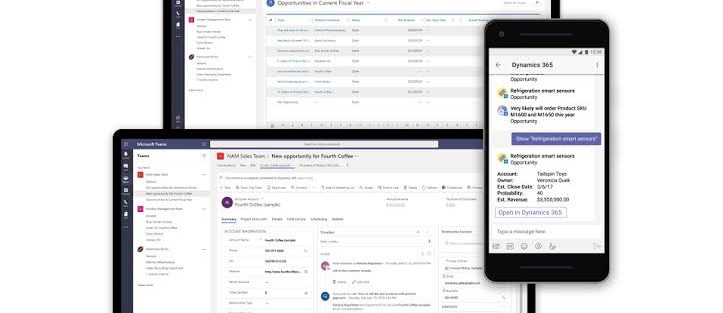
With Dynamics 365 and Teams, we’re speeding up the flow of work, enabling anyone in an organization to view and collaborate on Dynamics 365 records, from within the flow of work with Teams—at no additional cost. No other technology vendor enables organizations to activate this capability without the need to pay for multiple underlying software licenses.
Think about the incredible potential when you activate the flow of work with Dynamics 365 in Teams:
- A service engineer can enable an agent to fix a customer’s issue by adding notes with troubleshooting steps to the customer service case record.
- Finance teams can streamline order fulfillment, sharing purchase orders and payment details with their counterparts in sales.
- A field technician can notify sales teams about products nearing end-of-life, so the sales team can proactively reach out with replacement options.
- And a sales team can close deals faster, by understanding signals from the marketing department around demand generation.
Only Microsoft is enabling this kind of innovation and accessibility without adding new costs for an organization. We’re so excited to see how our customers and partners build on this innovation and unlock new capabilities for their organizations.
The essentials for cross-organizational collaboration
As business leaders shape their hybrid workplace strategy, we believe there are four “collaboration essentials” they must consider so they can work as one business, everywhere.
1. The new flow of work must connect everyone, across every business function
In a world of hybrid work, digital collaboration should help broaden networks, not constrict them. That’s why we’re making it easier for any Dynamics 365 user to seek out diverse perspectives, learnings, and insights from anywhere within the organization—between sales and engineering, marketing and finance, retail frontlines, and customer service.
Dynamics 365 users will soon be able to invite any Microsoft Teams user from across the organization to view and collaborate on business records right within the flow of a Teams chat or channel. This enables everyone in the organization to directly contribute to business activities in the moment, without needing to switch context across multiple apps and data sources.
2. Teams must be able to connect everywhere, anytime, on every channel
In the pre-COVID world, collaboration was largely synchronous—with team members working on a problem at the same time, either in person or in a virtual meeting. But today, collaboration must be asynchronous as well. In addition to the ability to meet live on video, employees also need the ability to share customer records, service cases, or workflows with any expert in the organization, in the flow of their work in Dynamics 365—and enable that expert to add value from anywhere, at any time.
For example, organizations can enable asynchronous collaboration by embedding chatbots in the flow of work. With new chatbot capabilities in Dynamics 365 Human Resources, employees can view time-off balances and submit leave requests from within Teams, without having to visit a separate HR portal. Employees simply type in a few keywords, and a chatbot can easily help them find out their leave balance or request time off. Managers can just as easily review and approve time-off requests with just a few clicks. With this self-service experience, employees and managers can work together on simple HR tasks from anywhere, at any time—all from within the flow of work with Teams.
Every organization, large and small, needs to bring collaboration into the flow of work. With Dynamics 365 Business Central, small and medium businesses can also connect people, processes, insights, and cross-functional team collaboration to make better decisions faster. Now in preview, Business Central users can paste a link to any Dynamics 365 record into a Microsoft Teams chat, and it will expand that into a compact card to share with coworkers. They can view card details, edit data, and take action without ever leaving Teams—in the office, at home, or on the go. In addition, users can look up business contacts, vendors, and customers that can be shared into chat, or used to bring up rich, actionable details in a window in Teams.
3. Collaboration must go beyond the office
Our research shows that remote work increased interactions with immediate teams and close networks, but dramatically diminished interactions with more distant networks. This is a worrying trend for business leaders, potentially leading to problems like groupthink or employee isolation. Dynamics 365 and Teams help organizations bring every network closer together so that those closest to the problem can access the people and information they need to spur innovation, wherever they are located.
On the retail frontlines, for example, it’s critical to have the most accurate product and inventory information on hand, as well as coordinate important tasks to keep stores running efficiently. New task management functionality now available in Dynamics 365 Commerce allows managers and workers to create task lists, manage assignment criteria, and track task statuses integrated between Dynamics 365 Commerce back office, store commerce, and Teams applications.
Collaboration happens in the moment, between anyone—from the home office to the factory floor to oil platforms. For example, in the coming months, we’re introducing new ways for field technicians to stay connected to work orders, information, and experts in real-time, even from some of the most remote job sites—all with seamless integration between Dynamics 365 Field Service, Dynamics 365 Remote Assist, and Teams.
4. The new world of work must be personalized
In addition to improving the way people work together across the organization, collaboration should improve how individuals and departments engage with end customers—enabling everyone to deliver more personalized experiences. In a world of hybrid work, it’s clear that virtual events will remain a key method for engaging with customers, and customer expectations for a personalized experience have risen.
This year, marketers will be able to set up, promote, and report on events hosted on Microsoft Teams from within Dynamics 365 Marketing. In a few simple steps, they can export attendee data and view customer segments created in Dynamics 365 Marketing based on audience attendance. Customer journeys, including starter emails, are also automatically created to nurture attendees. Users can then further customize the content and experiences for attendees based on how they engage and orchestrate personalized customer journeys.
One business, everywhere: Collaborate in the flow of work
As the definition of workplace continues to evolve, every organization needs to bring people, insights, and business processes together in collaborative spaces. These four essential capabilities—built into Dynamics 365 and Teams—will help everyone across your business work together from anywhere in a more seamless and natural way.
Learn more
- Website: Dynamics 365 and Microsoft Teams
- Microsoft Teams tech blog (Ignite 2021): What’s New in Microsoft Teams
- Dynamics 365 blog (Ignite 2021): Dynamics 365 and Microsoft Teams: extend collaboration across teams
- Dynamics 365 blog (Inspire 2021): Bring Dynamics 365 into the flow of work with Teams—at no additional cost
- Microsoft 365 blog (Inspire 2021): From collaborative apps in Microsoft Teams to Windows 365—here’s what’s new in Microsoft 365 at Inspire